
I wanted to interview at OpenAI but didn't know anyone there. I found a job posting from a hiring manager and figured I'd try something different.
What if I built an agent in Cursor to optimize my cold outreach?
The agent crawled everything this person had written publicly and built a knowledge base of their interests and communication style. Then it created a simulation model that scored different message variations on a 1-10 scale with reasoning. I used that simulation to drive an iterative loop, generating messages and improving them based on feedback. After nearly 300 iterations, I had a message that consistently scored 9 or higher.
I sent it on X. Two days later, I started the interview process at OpenAI.
That's when I realized something. Cursor could do a lot more than write code.
What Cursor Actually Is
At first glance, Cursor looks like VS Code. I think that's why people bucket it as "just another code editor." But once you start using it, you realize it's so much more. You can build anything in it.
I built a markdown renderer so that when I'm looking at markdown files, everything renders beautifully. I built scripts that pull data from iMessage, email, LinkedIn, and X. I built tools that create calendar events and reminders from tags in my notes. I built a voice dictation workflow with MacWhisper where I can talk to my computer and things just happen.
Cursor has become Notion on steroids for me. Actually, more than that. It's becoming the everything app.
How It Works: Scripts, Not Servers
The setup is simple. I have a /scripts directory with Python scripts that pull data from macOS. These aren't MCP servers. They're just scripts. Cursor calls them as tools, and I have a little Cursor rule that tells it what the tools are and what to do.
Here's what I've built:
reminders_cli.py scans markdown files for @reminder(...) tags and creates Apple Reminders via AppleScript.
calendar_cli.py creates Apple Calendar events from @calendar(...) tags for focus blocks and meetings.
imessage_send.py sends iMessages from @imessage(...) tags. Safe by default with dry-run mode.
imessage_dump.py exports iMessage conversations. I can filter by contact, date, or keyword.
email_search.py does fast email search using Mail's SQLite database.
whisper_extract_crm.py extracts transcripts from MacWhisper recordings and outputs them as markdown.
All these scripts do is output data directly into the context window. That's it. Once the data is in context, Cursor knows about it.
The Real Power: Everything in One Place
With the right scripts, you can cross-reference anything. I have markdown files full of every interaction I've had with people—emails, texts, LinkedIn messages, call transcripts—all timestamped with context about what was discussed.
When I open someone's file in Cursor, I can see our entire history across every channel. I can ask Cursor questions like "who should I follow up with this week?" or "what pattern do I see in conversations that led to upsells?" and it actually knows the answer because all the data is right there.
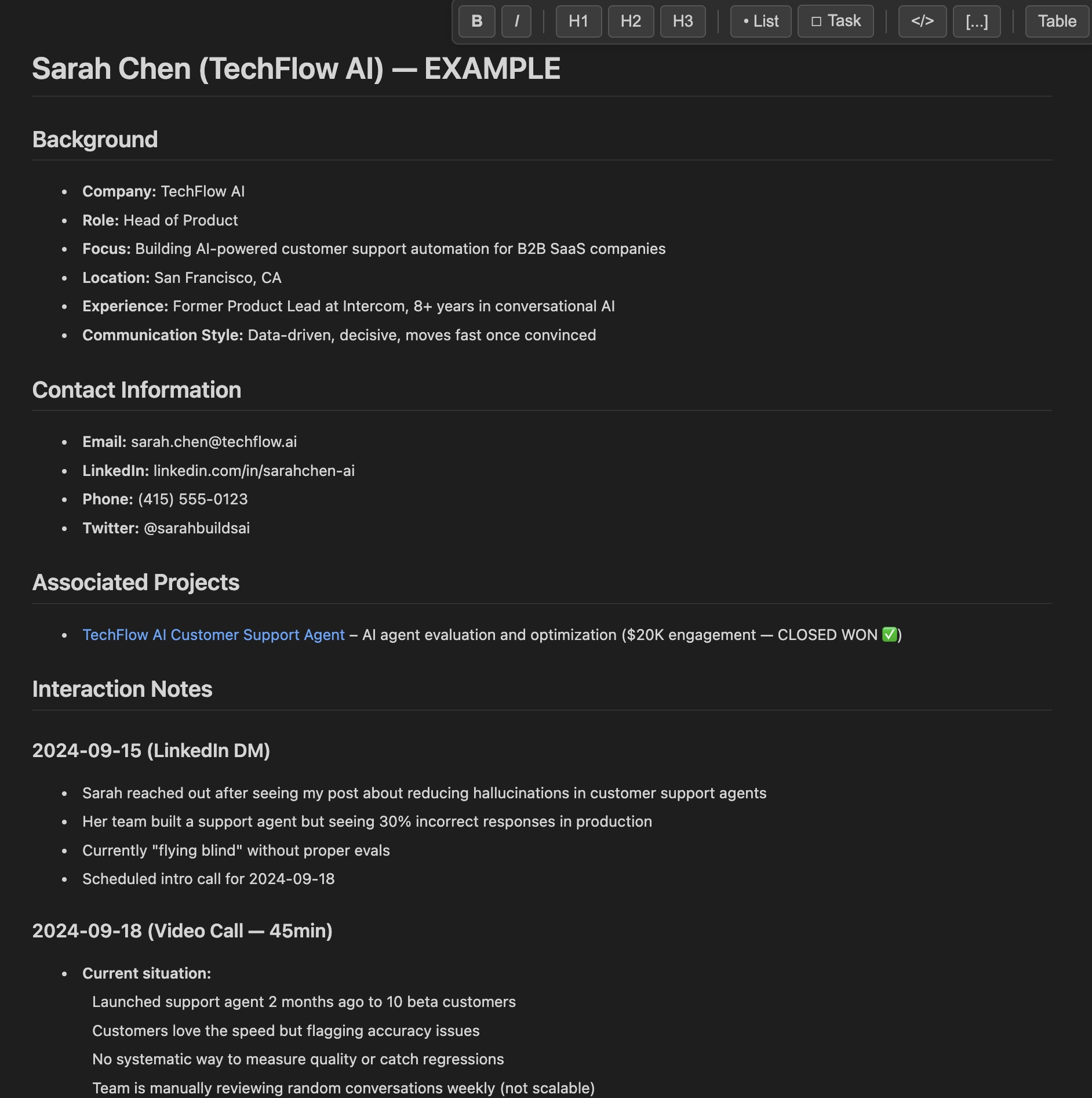 Click to zoom
The name is made up, but this is what an average person file looks like for me. Pure search with the full timeline of everything I need to know.
Click to zoom
The name is made up, but this is what an average person file looks like for me. Pure search with the full timeline of everything I need to know.
I have never found a CRM that could do this. I've never found a note-taking app that could do this. I've never found a task manager that could do this.
With MacWhisper or Whisper Flow, I can literally dictate to my computer and things happen. I'm talking, and tasks get created, calendar events get scheduled, messages get drafted. It feels magical.
How I Actually Use This
Here's a real workflow. I have a weekly planning file that looks like this:
 Click to zoom
This is way better than Notion
Click to zoom
This is way better than Notion
## Monday

### Morning
@calendar(message="Focus: Draft PRD for AI project", at="today 09:00", duration="90m", calendar="Work")
@reminder(message="Review client proposal", at="today 11:00", list="Work", priority=1)

### Afternoon
@imessage(to="David Corbitt", message="Hey, quick question about the project timeline")
@reminder(message="Follow up with Sean on partnership", at="today 15:00", list="Work")
These are just markdown annotations. But I have scripts that parse them and execute:
# Create all reminders for the week
python3 scripts/reminders_cli.py --file "weeks/week of 2025-11-12.md"

# Create all calendar events
python3 scripts/calendar_cli.py --file "weeks/week of 2025-11-12.md"

# Send messages
python3 scripts/imessage_send.py --file "weeks/week of 2025-11-12.md" --yes
The scripts are idempotent. They track what they've created. If I move a tag to a different line, it updates the existing item instead of creating a duplicate.
I can plan my entire week in markdown, let Cursor help me organize everything, then execute it all with a few commands.
Getting Data Back In
The other direction matters too. I want Cursor to see my messages and emails when I'm working on people files.
For iMessage history:
python3 scripts/imessage_dump.py --contacts "david corbitt" --since 2023-01-01 --output "/tmp/messages.md"
This dumps the entire conversation to markdown. I paste it into context or reference it from the person's file.
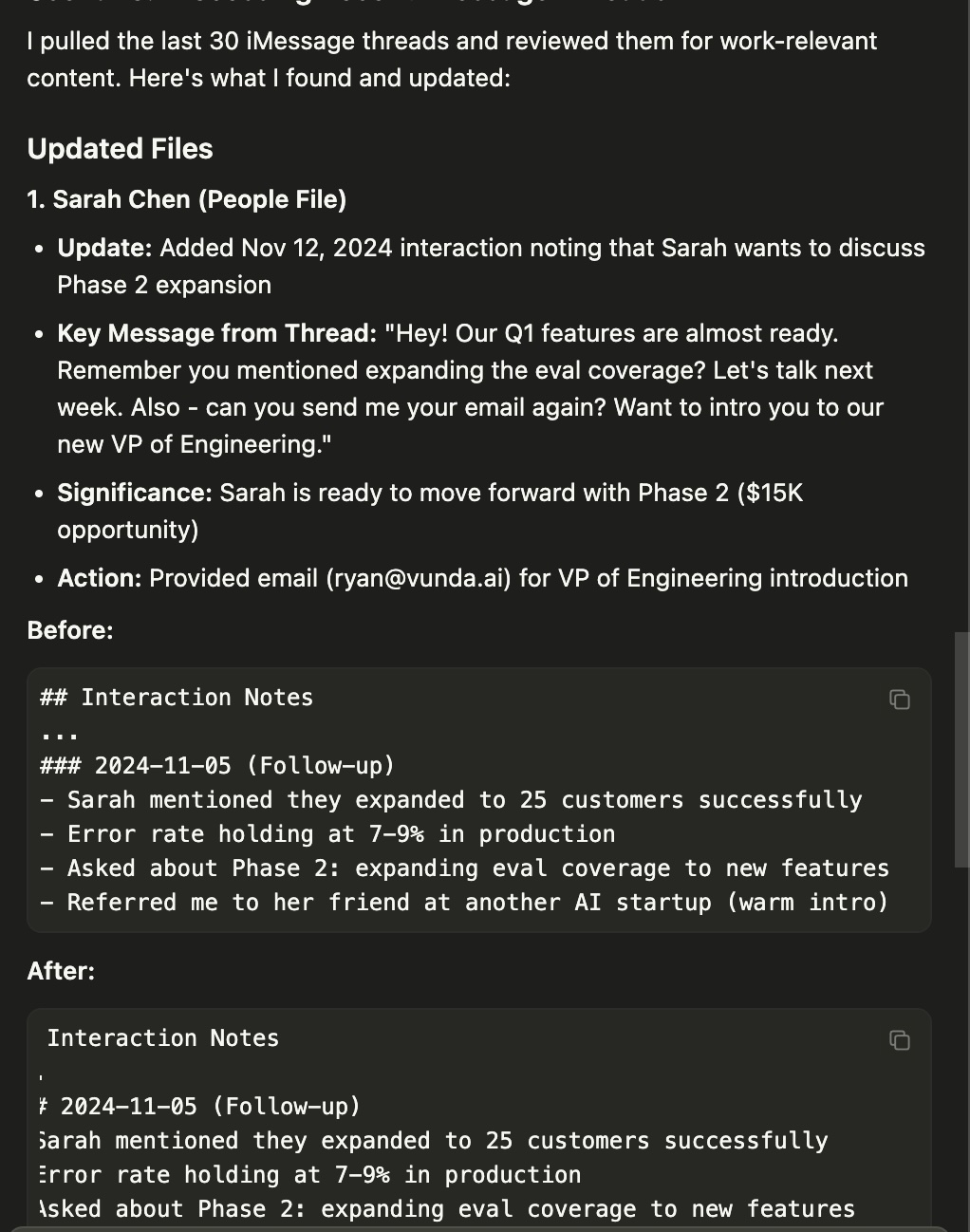 Click to zoom
Here I'm pulling the last 30 threads from iMessage and getting the full conversation for all of them directly into context.
Click to zoom
Here I'm pulling the last 30 threads from iMessage and getting the full conversation for all of them directly into context.
For email:
python3 scripts/email_search.py --from "john@example.com" --json > results.json
Fast SQLite-based search that returns structured JSON.
For call transcripts:
python3 scripts/whisper_extract_crm.py --format markdown
Extracts all MacWhisper recordings to markdown with speaker labels and timestamps.
Everything flows into Cursor's context. Once it's there, Cursor can reason about it, find patterns, make suggestions.
What This Actually Enables
I can ask Cursor questions that used to require digging through five different apps:
"Who should I follow up with this week based on conversation history?"
Cursor reads my files, sees the timeline of interactions, and suggests people I haven't contacted in a while or where a conversation left off with a clear next step.
"What's the pattern in customer conversations that led to upsells?"
Cursor analyzes call transcripts and message history across successful upsells, identifies common themes, and suggests which current prospects match that pattern.
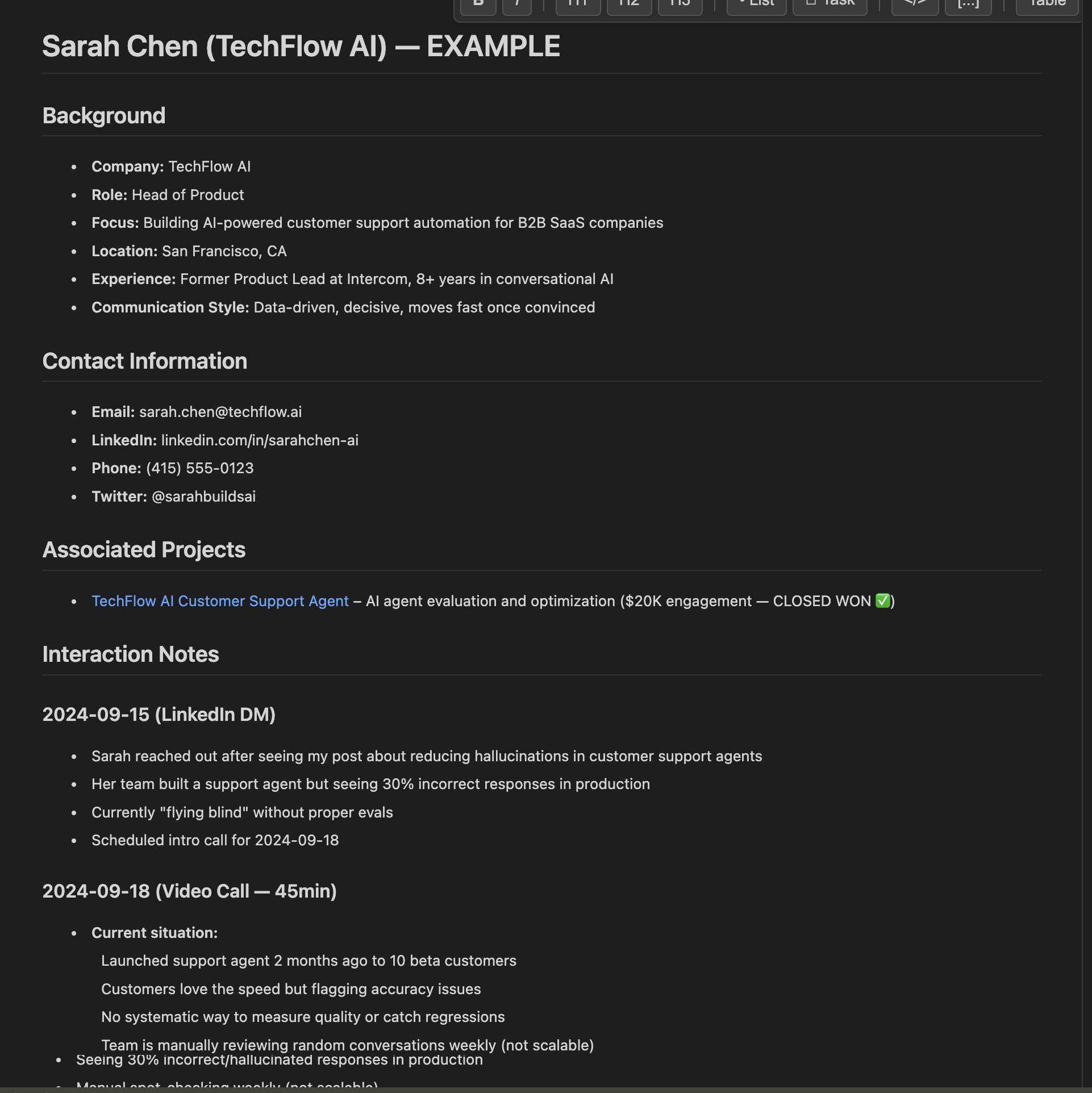 Click to zoom
Lead files track the full timeline of the relationship. The name is totally made up, but this shows what tracking a prospect looks like.
Click to zoom
Lead files track the full timeline of the relationship. The name is totally made up, but this shows what tracking a prospect looks like.
"Draft a follow-up message to Sarah based on our last three emails."
Cursor reads the email history, understands the context, and generates a message that references specific details from the conversation.
This worked because I made the data accessible. The AI can only reason about what it can see.
Why Local Matters
People talk about MCP servers like they're required. They're not. If you're running Cursor locally, you already have access to:
- The filesystem (read/write any file)
- SQLite databases (Messages, Mail, Contacts)
- Shell commands (AppleScript, osascript, curl)
- Any scripting language you want
You don't need to package this as an MCP server. For personal systems, scripts are faster to write, easier to debug, and simpler to maintain.
My entire setup is about 1,500 lines of Python across 9 scripts. No web server. No API. No deployment. Just files and shell commands. Cursor calls them via bash or I run them manually and paste results. Either way works.
The advantage of local is that there's no permission boundary. If I want Cursor to read my iMessages, I don't need OAuth. I just grant Terminal full disk access and query the SQLite database. Same for email, calendar, reminders, contacts.
The Custom Rules That Make It Work
I use Cursor's custom rules system to document everything. In my .cursorrules file, I have a section that documents every script:
# Scripts Directory Documentation

## 1. Apple Reminders (reminders_cli.py)

### What It Does
Scans markdown files for @reminder(...) tags and creates Apple Reminders.

### Tag Format
@reminder(message="Task name", at="2025-11-12 09:30", list="Work", priority=1)

### Usage Examples
python3 scripts/reminders_cli.py --file "weeks/week of 2025-11-12.md"
This documentation lives in the codebase. When Cursor reads my weekly planning file, it knows these tags exist and what they do. When I ask it to "schedule a focus block for tomorrow morning," it knows to write a @calendar tag. When I say "remind me to follow up with David next Tuesday," it writes a @reminder tag with the right format.
Cursor doesn't need to memorize anything. It just reads the rules and applies them.
What You Can Build
If you're using Cursor just for code completion, you're missing the point. Here's what's possible with a few hours of scripting:
Personal CRM: Track conversations across email, messages, LinkedIn, and X. Let Cursor suggest who to follow up with and what to say.
Meeting prep: Automatically pull the last 10 emails, messages, and call transcripts before a meeting. Cursor generates a brief.
Task ingestion: Scan messages and emails for task cues and automatically generate reminders.
Email cleanup: Bulk delete marketing emails while preserving important senders.
Focus time management: Schedule deep work blocks with one command. Cursor suggests optimal times based on your calendar.
Relationship tracking: Maintain a timeline of how relationships evolve. Cursor reminds you when it's been too long since you talked to someone.
None of this requires infrastructure. No deployment, no APIs, no learning new tools. Just scripts, markdown files, and making data accessible.
The Real Insight
Cursor works because I can give it whatever data I want. The constraint isn't the AI. The constraint is whether I've built the pipes to get the AI the information it needs.
That's why the same setup that helped me get the OpenAI interview also predicts customer upsells and identifies my target market. The infrastructure is the same: scripts that make data accessible, markdown files that structure it, and Cursor reasoning over all of it.
You can code scripts on the fly. Cursor will help you write them. They just work. And once they're working, you have a system that knows everything you know, remembers everything you forget, and helps you make decisions based on all of it.
That's why Cursor is the everything app.
Ready to Build Production AI Agents?
Let's discuss how AI agents can transform your business operations
Book a Strategy Call